BC Dialing Application
Business Central extension that integrates Nextiva phone and email events with Customer records. Receives incoming call and email notifications via API, creates or matches Customer records, and asynchronously syncs call summaries, recordings, and transcripts to Customer record links via Azure Blob Storage.
Overview
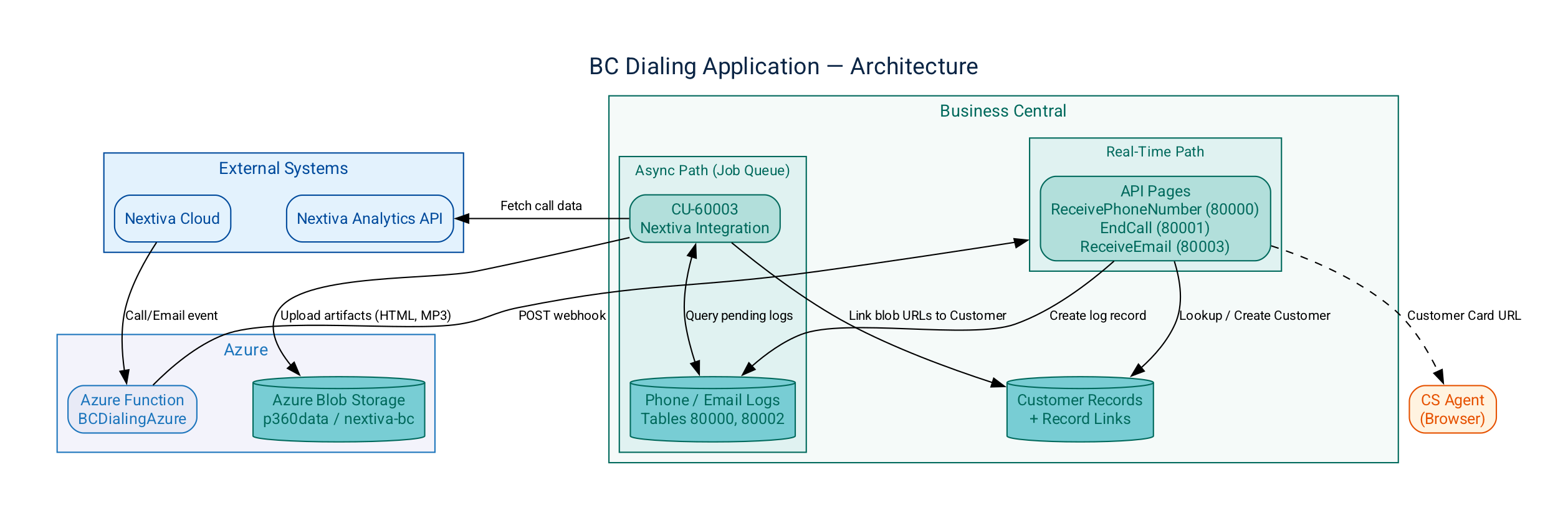
When a phone call or email arrives through Nextiva, an Azure Function forwards the event to one of this extension's API pages. The API page looks up the Customer by phone number or email address. If no match is found, it creates a new Customer from the configured customer template (default: ECOMMERCE) and returns a URL to the Customer Card. CS agents use this URL to immediately open the customer's record during the call.
After the call ends, a Job Queue entry (CU-60003) runs on a recurring schedule to process pending log records. For each record, the codeunit calls the Nextiva Analytics API to retrieve the call summary, recording, and transcript, then uploads each artifact to Azure Blob Storage and links the blob URL to the Customer record.
Architecture
Prerequisites
- Business Central version 27.0 or later (application 27.0.0.0, runtime 16.0)
- VS Code with the AL Language extension (for development)
- Azure Blob Storage account (
p360data) with thenextiva-bccontainer and a valid SAS token - Nextiva analytics API credentials (configured via the Nextiva Config Setup page)
- No BC extension dependencies — this extension is standalone
Object ID Allocation
| Object ID | Type | Name | Purpose |
|---|---|---|---|
| 60000 | Codeunit | Phone Integration | Original call handling logic (legacy) |
| 60001 | Codeunit | Attach Media Codeunit | Media attachment helper |
| 60002 | Codeunit | Azure Blob Storage | Blob storage operations (legacy) |
| 60003 | Codeunit | Nextiva Integration | Job Queue processor — async sync of summaries, recordings, transcripts, and emails |
| 60004 | Codeunit | Nextiva Integration Manual | Manual sync trigger with standalone API calls |
| 60005 | Codeunit | Dialer Upgrade | Upgrade codeunit — populates NextivaConfig on deployment |
| 60000 | Table Extension | CustomerDialerKeys | Secondary indexes on Customer table for Phone No. and E-Mail lookups |
| 60000 | Table | CallLog | Legacy call log table |
| 60001 | Table | AzureStorageConfig | Azure Storage configuration |
| 80000 | Table | CustomerPhoneLog | Phone call log records |
| 80001 | Table | NextivaData | Temporary data structure for Nextiva API processing |
| 80002 | Table | CustomerEmailLog | Email log records |
| 80003 | Table | NextivaConfig | Extension configuration |
| 80004 | Table | Nextiva Error Logs | Error log for failed sync operations |
| 60000 | Page | ReceivingComponent | Legacy receiving component UI |
| 60001 | Page | CompletionComponent | Legacy completion component UI |
| 60008 | Page | CallLogList | Call log list view |
| 60009 | Page | AzureStorageConfiguration | Azure Storage setup page |
| 60010 | Page | TestReceivingComponent | Test page for receiving component |
| 60011 | Page | TestCompletionComponent | Test page for completion component |
| 80000 | Page | ReceivePhoneNumber | API page — incoming phone call webhook |
| 80001 | Page | EndCall | API page — call end webhook |
| 80002 | Page | NextivaAPIViewer | Nextiva API data viewer |
| 80003 | Page | ReceiveEmail | API page — incoming email webhook |
| 80004 | Page | EndMailCall | Email call end page |
| 80005 | Page | CustomerPhoneLogViewer | Phone log list page |
| 80006 | Page | CustomerEmailLogViewer | Email log list page |
| 80007 | Page | NextivaSetupPage | Extension setup page |
| 80008 | Page | NextivaErrorLogsViewer | Error log viewer |
| 80009 | Page | NextivaManualSync | Manual sync trigger page |
| 80010 | Page | NextivaConfigAPI | API page — read-only config verification endpoint |
| — | PermissionSet | BCDialerPermissions | Extension permission set |
ID range 60000–99999 is reserved for this extension. Next available table: 80005. Next available page: 80011. Next available codeunit: 60006.
API Pages (Webhook Endpoints)
All API pages are published under APIPublisher = 'CambaySolutions' and APIGroup = 'PhoneIntegration'.
ReceivePhoneNumber (Page 80000)
Endpoint: POST /CambaySolutions/PhoneIntegration/PhoneNumbers
Receives an incoming phone call event. Looks up the Customer by Phone No.. If no match is found, creates a new Customer using the ECOMMERCE template with Name = 'New Customer' and the incoming phone number. Returns the Customer Card URL and Customer No.
| Field | Type | Direction | Description |
|---|---|---|---|
phonenumber | Text | In | Incoming phone number |
customerurl | Text | Out | URL to the Customer Card in BC |
customernum | Text | Out | Customer No. |
EndCall (Page 80001)
Endpoint: POST /CambaySolutions/PhoneIntegration/CallEnds
Receives a call-end event with the Nextiva session ID. Creates a phone log record for the Job Queue to process asynchronously.
| Field | Type | Direction | Description |
|---|---|---|---|
phonenum | Text | In | Phone number |
sessionid | Text | In | Nextiva session ID for API lookups |
ReceiveEmail (Page 80003)
Endpoint: POST /CambaySolutions/PhoneIntegration/Emails
Receives an incoming email event. Same Customer lookup/creation logic as ReceivePhoneNumber but matches on E-Mail instead of Phone No..
| Field | Type | Direction | Description |
|---|---|---|---|
email | Text | In | Incoming email address |
customerurl | Text | Out | URL to the Customer Card in BC |
customernum | Text | Out | Customer No. |
Customer Record Management
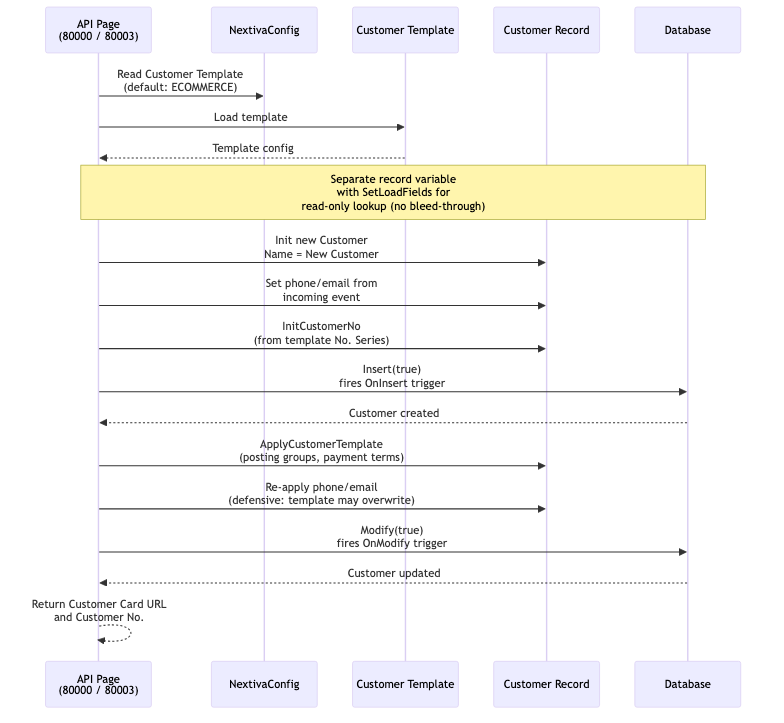
When an incoming call or email arrives for a phone number or email address not already on file:
- The customer template is loaded from
NextivaConfig."Customer Template"(default:ECOMMERCE) viaCustomer Templ. - A new Customer record is initialized with
Name = 'New Customer'and the incoming phone/email - The customer number is assigned via
InitCustomerNofrom the template's No. Series Insert(true)fires the standard OnInsert trigger for complete BC customer setupApplyCustomerTemplateapplies template defaults (posting groups, payment terms, etc.)- The phone number or email is re-applied after template application as a defensive measure
Modify(true)persists the final state
Read-only lookups use SetLoadFields with a separate record variable to avoid SetLoadFields bleed-through into the creation path.
Job Queue & Async Processing
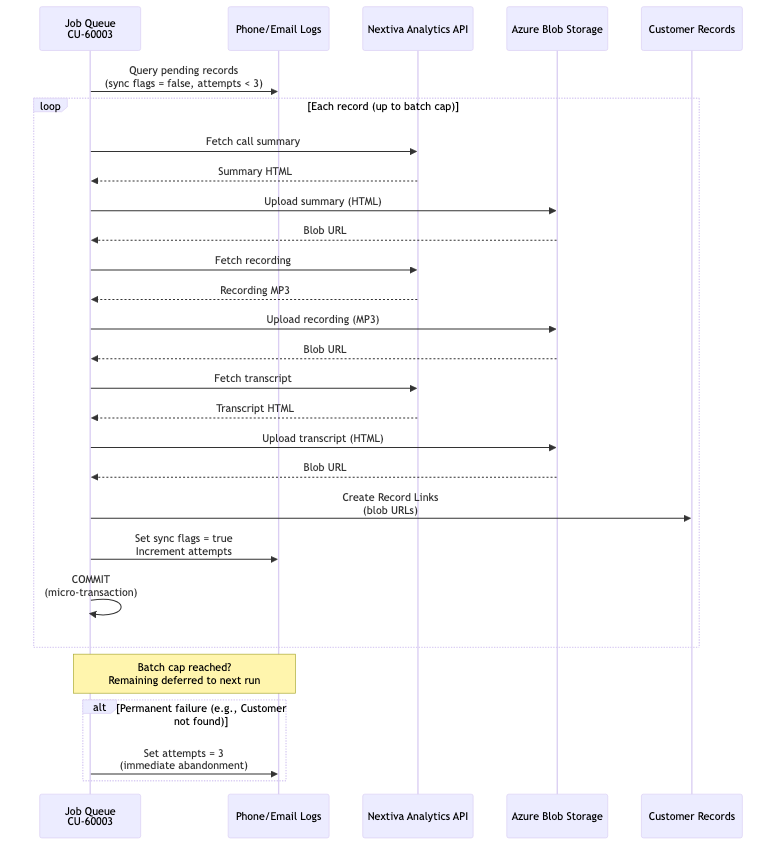
Codeunit 60003 (Nextiva Integration) runs as a recurring Job Queue entry. Each cycle processes up to Max Phone Logs Per Run phone records and Max Email Logs Per Run email records (both configurable, default 50):
- Queries
CustomerPhoneLogfor records where all three sync flags arefalseandAttempts < 3 - For each pending record (up to the batch cap), calls the Nextiva Analytics API to fetch the call summary, recording URL, and transcript
- Uploads each artifact (HTML for summary/transcript, MP3 for recording) to Azure Blob Storage
- Creates a Record Link on the matched Customer record pointing to the blob URL
- Sets the corresponding sync flag (
SummaryUpdated,TranscriptUpdated,RecordingUpdated) totrueand increments theAttemptscounter in a single database write - Commits after each record (micro-transaction pattern) to release locks between iterations
- When the batch cap is reached, remaining records are deferred to the next Job Queue run
The same pattern applies for email logs using InboundEmailUpdated and OutboundEmailUpdated flags.
Records with 3 or more attempts are skipped — these represent persistent failures that need manual investigation via the Nextiva Error Logs viewer (Page 80008). Records that fail due to permanent conditions (e.g., no matching Customer) are immediately abandoned (set to 3 attempts) to avoid wasting retries.
Logging & Monitoring
- Nextiva Error Logs (Table 80004, Page 80008): Captures errors from the Job Queue processor with source type, source number, session ID, customer number, and error message
- Application Insights: Extension-level telemetry flows to Bestway's Azure Application Insights resource via the connection string in
app.json - Phone/Email Log Viewers (Pages 80005, 80006): Browse all phone and email log records with their sync status flags and attempt counts
Development
Folder Structure
Cambay Solutions_BC Dialing Application/
├── app.json
├── BCDialerPermissions.permissionset.al
├── README.md
├── docs/
│   ├── CHANGELOG.md
│   ├── CHANGE-v2.4.0.0.md
│   ├── CHANGE-v2.3.0.0.md
│   ├── CHANGE-v2.2.1.0.md
│   ├── CHANGE-v2.2.0.0.md
│   ├── CHANGE-v2.1.0.0.md
│   └── INVESTIGATION-Performance-Locking.md
├── tools/
│   ├── verify_deployment.py         (deployment verification script)
│   └── requirements.txt
├── src/
│   ├── Codeunit/
│   ├── Page/
│   ├── Table/
│   └── TableExt/
└── BCDialingAzure/                  (Azure Function — separate deployment)
Download Symbols
Run AL: Download Symbols in VS Code to pull base application symbols into .alpackages/.
Publish to Sandbox
Press F5 or run AL: Publish to deploy to the configured sandbox environment.
Package
Run AL: Package to build the .app file for deployment to other environments.
Configuration
All integration credentials and environment-specific values are stored in the NextivaConfig table (80003), managed via the Nextiva Config Setup page (80007). The upgrade codeunit (CU-60005) auto-populates the config record during initial deployment.
| Field | Purpose | Example |
|---|---|---|
| BC Base URL | Customer Card URL template (must contain %1 for customer number) | https://businesscentral.dynamics.com/.../Production/?company=...&page=21&filter=''No.'' IS ''%1'' |
| Customer Template | BC Customer Template code used when creating new customers | ECOMMERCE |
| Nextiva Login URL | Nextiva authentication endpoint | https://login.thrio.com |
| Nextiva AuthText | Nextiva API credentials (stored masked) | user@nextiva.com:password |
| Azure Blob SAS Token | SAS token for Azure Blob Storage container access (stored masked) | si=BCDialer&spr=https&... |
| Max Phone Logs Per Run | Maximum phone log records processed per Job Queue run (default: 50) | 50 |
| Max Email Logs Per Run | Maximum email log records processed per Job Queue run (default: 50) | 50 |
Deployment Verification
A Python deployment verification script is included at tools/verify_deployment.py. It validates config population, Nextiva API connectivity, Azure Blob access, and customer template existence. See docs/CHANGE-v2.3.0.0.md for full usage instructions.
cd tools
../../tools/venv/bin/python verify_deployment.py --config-only        # config check only
../../tools/venv/bin/python verify_deployment.py \                     # full validation
    --nextiva-auth-text "user:pass" --azure-sas-token "si=BCDialer&..."
Requires Python 3.13 venv at ../../tools/venv/ with requests, python-dotenv, and azure-storage-blob.
Known Limitations
- Hardcoded credential fallbacks (transitional) — v2.3.0.0 reads all credentials from the NextivaConfig table but retains hardcoded fallback values in
elsebranches for backward compatibility. Each fallback branch emits aSession.LogMessagewarning to Application Insights (event IDsBCDIALER-0001throughBCDIALER-0003), making fallback activation immediately detectable in telemetry. After confirming the config-driven approach works in production (noBCDIALER-000*warnings in telemetry), the fallbacks should be replaced withError()calls in v2.4.0.0. Seedocs/CHANGE-v2.3.0.0.md(Credential Migration section) for the complete inventory, KQL query, and remediation plan. - Azure Storage Account and Container not yet configurable — The storage account name (
p360data) and container name (nextiva-bc) remain hardcoded in CU-60003 and CU-60004. These should be added to NextivaConfig in v2.4.0.0. - No automated tests — The extension has no AL test codeunits. Business logic in the API pages and Job Queue processor should be extracted into testable helper codeunits.
- Duplicate Customer risk — Simultaneous API calls for the same phone number could theoretically create duplicate Customers (sub-millisecond race window). See
docs/CHANGE-v2.2.0.0.mdfor full analysis.
Changelog
See docs/CHANGELOG.md for the full version history, docs/ for detailed per-version change documents, and docs/INVESTIGATION-Performance-Locking.md for the full performance investigation timeline (v2.0.0.12 through v2.3.0.0).