Bestway CSM API Toolkit
A Business Central AL extension that exposes read-only OData v4 API endpoints for service order data, fault reporting tables, and posted document lines. Built for the Bestway USA CSM (Customer Service Management) integration workflow and CMS FAQ Management automated test validation.
Overview
This extension publishes custom API pages under the bestway/csm/v1.0 API group. External systems (e.g., CSM platforms, reporting tools, automated test suites) can query service order data, fault reporting master tables, code relationships, and posted document lines.
All endpoints are read-only — POST, PATCH, and DELETE requests are rejected.
Prerequisites
- Business Central version 27.0 or later (application 27.0.0.0, runtime 16.0)
- BestwayUSA extension (publisher: Innovia Consulting, v27.0.0.0) — provides custom
INVC-prefixed fields on Service Header, Service Line, Service Invoice Header, and Document Attachment tables - VS Code with the AL Language extension (for development)
Object ID Allocation
| Object ID | Type | Name | Source Table | Description |
|---|---|---|---|---|
| 56101 | Page | Service Order API | Service Header | Service order headers |
| 56102 | Page | Service Order Line API | Service Line | Service order lines (subpage) |
| 56103 | Page | Serv. Order Attachment API | Document Attachment | Document attachments (subpage) |
| 56104 | Codeunit | CSM API Helper | — | Extracted computed field logic for testability |
| 56105 | Page | Fault Area API | Fault Area (5915) | Fault area master data |
| 56106 | Page | Symptom Code API | Symptom Code (5916) | Symptom code master data |
| 56107 | Page | Fault Code API | Fault Code (5918) | Fault code master data |
| 56108 | Page | Resolution Code API | Resolution Code (5919) | Resolution code master data |
| 56109 | Page | Fault Resol. Relation API | Fault/Resol. Cod. Relationship (5920) | Code relationship mappings |
| 56120 | Page | FA Symptom Relation API | INVC FA Symptom Code Relation (50113) | Fault area/symptom code relationships |
| 56121 | Page | Posted Svc. Invoice Line API | Service Invoice Line (5993) | Posted service invoice lines |
| 56122 | Page | Posted Svc. Shipment Line API | Service Shipment Line (5991) | Posted service shipment lines |
| 56123 | Page | Posted Svc. Invoice Header API | Service Invoice Header (5992) | Posted service invoice headers |
ID range 56100–56149 is reserved for this extension. Next available: 56124.
Data Model
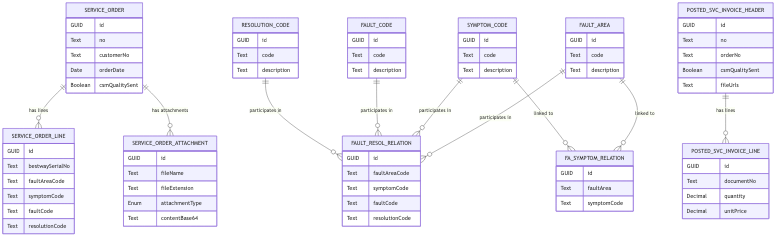
API Reference
Base URL pattern:
https://api.businesscentral.dynamics.com/v2.0/{tenantId}/{environment}/api/bestway/csm/v1.0/companies({companyId})
Service Orders (Page 56101)
Endpoint: /serviceOrders
Source Table: Service Header (filtered to Document Type = Order)
| Field | Type | Description |
|---|---|---|
id | GUID | SystemId |
no | Text | Service order number |
customerNo | Text | Customer number |
orderDate | Date | Order date |
postingDate | Date | Posting date |
csmQualitySent | Boolean | Computed: true if any posted service invoice for this order has INVC CSM Quality Sent = true |
Subpages (expandable via $expand):
serviceOrderLines— linked by Document Type + Document No.serviceOrderAttachments— linked by No.
Service Order Lines (Page 56102)
Endpoint: /serviceOrders({id})/serviceOrderLines
Source Table: Service Line
| Field | Type | Description |
|---|---|---|
id | GUID | SystemId |
no | Text | Line No. |
bestwaySerialNo | Text | INVC Bestway Serial No. from BestwayUSA extension |
itemCategoryCode | Text | Item category code |
faultAreaCode | Text | Fault area code |
faultAreaDescription | Text | Looked up from Fault Area table |
symptomCode | Text | Symptom code |
symptomCodeDescription | Text | Looked up from Symptom Code table |
faultCode | Text | Fault code |
faultCodeDescription | Text | Looked up from Fault Code table |
resolutionCode | Text | Resolution code |
description | Text | Line description |
description2 | Text | Line description 2 |
quantity | Decimal | Quantity |
serviceItemNo | Text | Service item number |
itemNo | Text | Looked up from Service Item → Item No. |
salesDate | Date | Looked up from Service Item → Sales Date |
Service Order Attachments (Page 56103)
Endpoint: /serviceOrders({id})/serviceOrderAttachments
Source Table: Document Attachment (filtered to Table ID = 5900, Document Type = Order)
| Field | Type | Description |
|---|---|---|
id | GUID | SystemId |
documentNo | Text | Service order number |
lineNo | Integer | Attachment line number |
fileName | Text | File name |
fileExtension | Text | File extension (e.g., .jpg) |
fileType | Enum | File type (e.g., Image, PDF) |
attachmentType | Enum | INVC Document Attachment Type from BestwayUSA extension |
contentBase64 | Text | Base64-encoded file content (streamed via Temp Blob + Base64 Convert) |
Fault Areas (Page 56105)
Endpoint: /faultAreas
Source Table: Fault Area (5915)
| Field | Type | Description |
|---|---|---|
id | GUID | SystemId |
code | Text | Fault area code |
description | Text | Fault area description |
Symptom Codes (Page 56106)
Endpoint: /symptomCodes
Source Table: Symptom Code (5916)
| Field | Type | Description |
|---|---|---|
id | GUID | SystemId |
code | Text | Symptom code |
description | Text | Symptom code description |
Fault Codes (Page 56107)
Endpoint: /faultCodes
Source Table: Fault Code (5918)
| Field | Type | Description |
|---|---|---|
id | GUID | SystemId |
code | Text | Fault code |
description | Text | Fault code description |
Resolution Codes (Page 56108)
Endpoint: /resolutionCodes
Source Table: Resolution Code (5919)
| Field | Type | Description |
|---|---|---|
id | GUID | SystemId |
code | Text | Resolution code |
description | Text | Resolution code description |
Fault/Resolution Relations (Page 56109)
Endpoint: /faultResolutionRelations
Source Table: Fault/Resol. Cod. Relationship (5920)
| Field | Type | Description |
|---|---|---|
id | GUID | SystemId |
faultAreaCode | Text | Fault area code |
symptomCode | Text | Symptom code |
faultCode | Text | Fault code |
resolutionCode | Text | Resolution code |
serviceItemGroupCode | Text | Service item group code |
description | Text | Relationship description |
occurrences | Integer | Usage count |
createdManually | Boolean | Whether created manually vs. auto-generated |
Fault Area/Symptom Relations (Page 56120)
Endpoint: /faultAreaSymptomRelations
Source Table: INVC FA Symptom Code Relation (50113)
| Field | Type | Description |
|---|---|---|
id | GUID | SystemId |
faultArea | Text | Fault area code |
symptomCode | Text | Symptom code |
Posted Service Invoice Headers (Page 56123)
Endpoint: /postedServiceInvoiceHeaders
Source Table: Service Invoice Header (5992)
| Field | Type | Description |
|---|---|---|
id | GUID | SystemId |
no | Text | Posted invoice document number |
customerNo | Text | Customer number |
orderNo | Text | Original service order number |
orderDate | Date | Order date |
postingDate | Date | Posting date |
locationCode | Text | Location code |
csmQualitySent | Boolean | INVC CSM Quality Sent flag from BestwayUSA extension |
fileUrls | Text | Computed: JSON array of Link-type Record Link URLs attached to this invoice. Notes and other Record Link types are excluded. Format: [{"url":"https://...","type":"1"}] |
Subpage (expandable via $expand):
postedServiceInvoiceLines— linked by Document No.
Posted Service Invoice Lines (Page 56121)
Endpoint: /postedServiceInvoiceLines
Source Table: Service Invoice Line (5993)
| Field | Type | Description |
|---|---|---|
id | GUID | SystemId |
documentNo | Text | Posted invoice document number |
lineNo | Integer | Line number |
type | Enum | Line type (Item, Resource, Cost, G/L Account) |
no | Text | Item/resource/account number |
description | Text | Line description |
description2 | Text | Line description 2 |
quantity | Decimal | Quantity |
unitPrice | Decimal | Unit price |
lineAmount | Decimal | Line amount |
customerNo | Text | Customer number |
orderNo | Text | Original service order number |
postingDate | Date | Posting date |
serviceItemNo | Text | Service item number |
serviceItemSerialNo | Text | Service item serial number |
itemCategoryCode | Text | Item category code |
faultAreaCode | Text | Fault area code |
symptomCode | Text | Symptom code |
faultCode | Text | Fault code |
resolutionCode | Text | Resolution code |
faultReasonCode | Text | Fault reason code |
bestwaySerialNo | Text | INVC Bestway Serial No. |
faultCodeDescription | Text | INVC Fault Code Description |
symptomCodeDescription | Text | INVC Symptom Code Description |
faultAreaDescription | Text | INVC Fault Area Description |
itemNo | Text | Computed: Item No. looked up from Service Item record |
salesDate | Date | Computed: Sales Date looked up from Service Item record |
Posted Service Shipment Lines (Page 56122)
Endpoint: /postedServiceShipmentLines
Source Table: Service Shipment Line (5991)
| Field | Type | Description |
|---|---|---|
id | GUID | SystemId |
documentNo | Text | Posted shipment document number |
lineNo | Integer | Line number |
type | Enum | Line type |
no | Text | Item/resource/account number |
description | Text | Line description |
description2 | Text | Line description 2 |
quantity | Decimal | Quantity |
customerNo | Text | Customer number |
orderNo | Text | Original service order number |
postingDate | Date | Posting date |
serviceItemNo | Text | Service item number |
serviceItemSerialNo | Text | Service item serial number |
itemCategoryCode | Text | Item category code |
faultAreaCode | Text | Fault area code |
symptomCode | Text | Symptom code |
faultCode | Text | Fault code |
resolutionCode | Text | Resolution code |
faultReasonCode | Text | Fault reason code |
OData Query Examples
All examples use the service orders endpoint. Replace {baseUrl} with your base URL.
Filter by order number:
GET {baseUrl}/serviceOrders?$filter=no eq 'SO-001234'
Filter by date range:
GET {baseUrl}/serviceOrders?$filter=orderDate ge 2024-01-01 and orderDate le 2024-12-31
Filter by customer:
GET {baseUrl}/serviceOrders?$filter=customerNo eq 'C00010'
Filter by CSM quality sent status:
GET {baseUrl}/serviceOrders?$filter=csmQualitySent eq false
Expand lines and attachments:
GET {baseUrl}/serviceOrders?$expand=serviceOrderLines,serviceOrderAttachments
Sort by order date (newest first):
GET {baseUrl}/serviceOrders?$orderby=orderDate desc
Get count with results:
GET {baseUrl}/serviceOrders?$count=true
Limit results:
GET {baseUrl}/serviceOrders?$top=10
Combined (filter + sort + count + expand):
GET {baseUrl}/serviceOrders?$filter=orderDate ge 2024-01-01&$orderby=orderDate desc&$count=true&$expand=serviceOrderLines,serviceOrderAttachments
Filter attachment lines by type:
GET {baseUrl}/serviceOrders({id})/serviceOrderAttachments?$filter=attachmentType eq 'DamagePhoto'
Postman Guide
A pre-built Postman collection is included at BestwayCSM.postman_collection.json.
Import the collection
- Open Postman and click Import.
- Select
BestwayCSM.postman_collection.json.
Configure variables
Edit the collection variables (click the collection name → Variables tab):
| Variable | Description |
|---|---|
tenantId | Your Azure AD tenant ID (GUID) |
companyId | Business Central company ID (GUID) |
clientId | Azure AD app registration client ID |
clientSecret | Azure AD app registration client secret |
serviceOrderId | A service order SystemId GUID (for single-record requests) |
serviceOrderNo | A service order number (for filter-based requests) |
Configure authentication
The collection uses OAuth2 client credentials at the collection level. The token URL is:
https://login.microsoftonline.com/{tenantId}/oauth2/v2.0/token
With scope: https://api.businesscentral.dynamics.com/.default
To get a token: click the collection → Authorization tab → Get New Access Token → Use Token.
Run requests
The collection includes folders for:
- Service Orders — all orders, single order by ID, filter by date/customer/quality-sent, sorting, pagination, expand lines/attachments
- Service Order Lines — lines for a specific order, filter by fault area, count
- Service Order Attachments — attachments for a specific order, filter by file type/extension/attachment type, count
Authentication
The API uses standard Business Central OData authentication. For external integrations, configure an Azure AD app registration with:
- API permissions:
Dynamics 365 Business Central→API.ReadWrite.All(orFinancials.ReadWrite.All) - Client secret for server-to-server authentication
- A BC user mapped to the app registration with appropriate Service Management permissions
Alternatively, use user-delegated OAuth2 flow for interactive/testing scenarios (e.g., Postman authorization code flow).
Development
Folder structure
AL source files are organized by object type:
bc-csm-api/
├── Codeunit/     Helper codeunits (CsmApiHelper)
├── Page/         API page objects (all 11 endpoints)
└── docs/         Changelog and change documents
Files follow the {Name}.{ObjectType}.al naming convention (e.g., ServiceOrderAPI.Page.al, CsmApiHelper.Codeunit.al).
Download symbols
Run AL: Download Symbols in VS Code to pull base application and BestwayUSA dependency symbols into .alpackages/.
Publish to sandbox
Press F5 or run AL: Publish to deploy to the configured sandbox environment (see .vscode/launch.json).
Package
Run AL: Package to build the .app file for deployment to other environments.
Testing
Automated tests live in a separate extension at ../bc-csm-api-test/.
Test Object Allocation
| Object ID | Type | Name | Tests |
|---|---|---|---|
| 56110 | Codeunit | CSM API Test Library | Test data helpers |
| 56111 | Codeunit | Service Order API Test | 4 unit tests |
| 56112 | Codeunit | Service Order Line API Test | 11 unit tests |
| 56113 | Codeunit | Serv. Order Attach. API Test | 3 unit tests |
| 56114 | Codeunit | Serv. Order API Func. Test | 2 functional tests |
| 56115 | Codeunit | Posted Inv. Header API Test | 6 unit tests |
Test ID range 56110–56119 is reserved for the test extension. Next available: 56116.
Test categories
Unit tests (56111–56113): Exercise the CSM API Helper codeunit in isolation — computed field lookups, Base64 encoding, edge cases.
Functional tests (56114): Open the actual API pages via TestPage and verify end-to-end behavior:
- Get Service Order by ID — creates a full order with line + attachment + lookup master data, navigates to the record, asserts all fields including computed values (csmQualitySent, itemNo, faultAreaDescription, etc.) and subpage content (lines, attachments with base64).
- Get Service Orders (top 20 with expand) — creates 25 orders each with a line and attachment, iterates up to 20 records, verifies each has accessible line and attachment subpages.
Running tests
- Publish the main extension (
bc-csm-api) to the sandbox. - Open
bc-csm-api-testin VS Code, run AL: Download Symbols, then AL: Publish. - Navigate to the Test Tool page (130401) in the sandbox.
- Add the test codeunits (56111–56114) and run all tests.
All tests use BC's auto-rollback transaction model — inserted test data rolls back after each test.