E164 Phone Format
Business Central extension that enforces E.164 international phone number format (+15551234567) for Customer phone, fax, and mobile phone fields. Provides bulk migration tooling with preview, rollback, and error logging.
Overview
E.164 is the international standard for phone number formatting. Numbers are stored as + followed by the country code and subscriber number (e.g., +15551234567 for a US number). This extension converts and enforces E.164 format across all Customer phone fields in Business Central.
Features
- Bulk migration of existing Customer phone data to E.164 format
- Preview mode — dry-run summary showing what the migration would convert, skip, and sample conversions
- Rollback — restore all migrated numbers to their original values from backup
- Migration error log — table and list page showing records that could not be converted, with a link to open the Customer Card for manual correction
- Auto-format on input — phone numbers entered on the Customer Card are validated and converted to E.164 in real time
- NANP display formatting — US/CA numbers stored as
+15551234567are displayed as(555) 123-4567on the Customer Card
Installation
- Install the extension in your Business Central environment
- Assign the "E164 Phone Perm Set" permission set to users who need access
- Search for "E164 Phone Migration Setup" to open the setup page
Usage
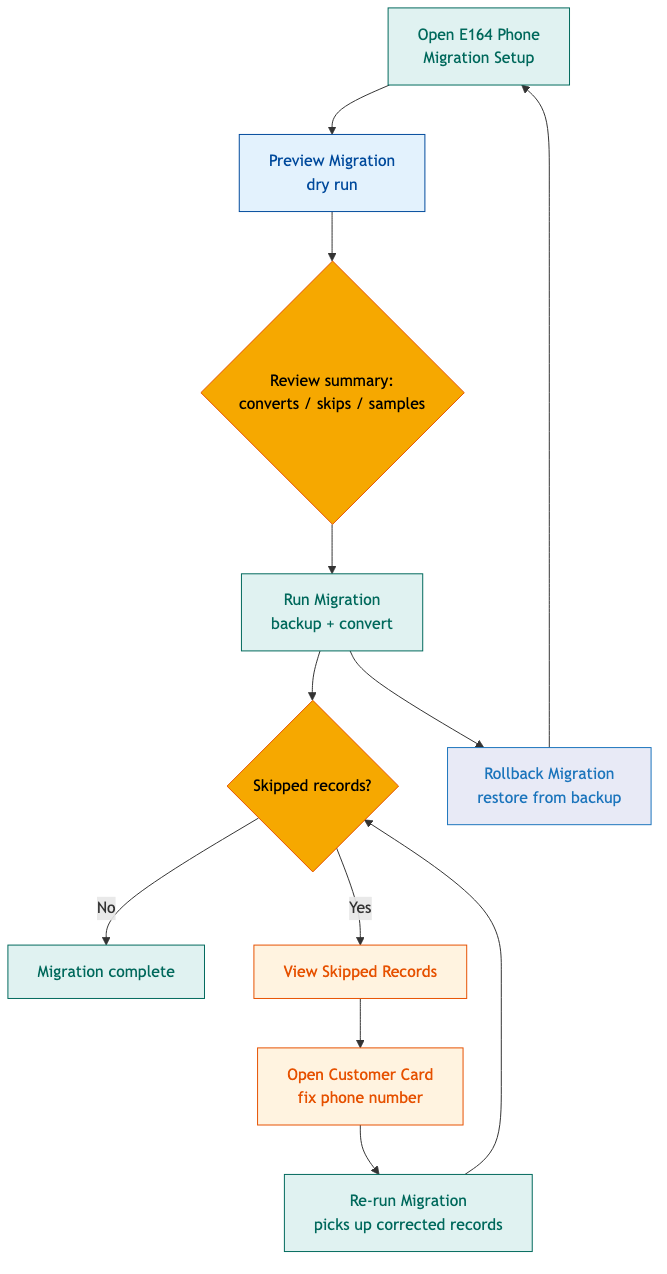
Running a Migration
- Open E164 Phone Migration Setup (search in the role center)
- Click Preview Migration to see a dry-run summary — how many phone, fax, and mobile fields would be converted or skipped, with sample conversions
- Click Run Migration to convert all customer phone numbers to E.164 format. Original values are backed up automatically.
- Review the statistics on the setup page. If any records were skipped:
- Click View Skipped Records to see the error log
- Click Open Customer Card on each skipped record to manually fix the phone number
- Re-run the migration to pick up the corrected records
Rollback
Click Rollback Migration on the setup page to restore all migrated customers to their original phone, fax, and mobile values. The rollback uses the backup records created during migration.
Customer Card Behavior
- The standard Phone No. and Fax No. fields are hidden and replaced with formatted display fields
- Display: NANP numbers (+1) are shown as
(555) 123-4567; other formats are shown as-is - Input: When you enter or edit a phone/fax number, it is validated and converted to E.164 on tab-out. Invalid numbers produce an error message.
Customer List Behavior
Phone numbers on the Customer List are stored in E.164 format and are searchable by digits.
Permission Set
The "E164 Phone Perm Set" (ID 57100) grants full access to all extension objects. Users without this permission set cannot open the setup page or run migrations.
| Object Type | Object | Permission |
|---|---|---|
| Codeunit | E164 Phone Format | Execute |
| Codeunit | E164 Phone Subscribers | Execute |
| Codeunit | E164 Phone Install | Execute |
| Codeunit | E164 Phone Upgrade | Execute |
| Table | E164 Phone Backup | Execute |
| Table Data | E164 Phone Backup | Read, Insert, Modify, Delete |
| Table | E164 Migration Error | Execute |
| Table Data | E164 Migration Error | Read, Insert, Modify, Delete |
| Page | E164 Phone Setup | Execute |
| Page | E164 Migration Errors | Execute |
Supported Country Codes
| Country/Region Code | Dial Code | Notes |
|---|---|---|
US, USA | +1 | NANP — 10-digit numbers get +1 prefix |
CA, CAN | +1 | NANP — same as US |
MX, MEX | +52 | 7-14 digit numbers get +52 prefix |
| (empty or other) | +1 | Defaults to US |
Objects
| ID | Name | Type |
|---|---|---|
| 57100 | E164 Phone Format | Codeunit |
| 57101 | E164 Phone Subscribers | Codeunit |
| 57102 | E164 Phone Install | Codeunit |
| 57103 | E164 Phone Upgrade | Codeunit |
| 57104 | E164 Phone Backup | Table |
| 57105 | E164 Migration Error | Table |
| 57104 | E164 Phone Setup | Page |
| 57105 | E164 Migration Errors | Page |
| 57100 | E164 Customer Card | Page Extension |
| 57100 | E164 Phone Perm Set | Permission Set |
Changelog
v1.2.1.0
- Changed telemetry scope from
ExtensionPublishertoAllso events are visible in the environment's Application Insights
v1.2.0.0
- Added Mobile Phone No. migration, validation, and display formatting
- Added E164 Migration Error table and E164 Migration Errors list page for tracking skipped records
- Added View Skipped Records action on the setup page
- Removed BestwayUSA app dependency — extension is now standalone
- Added Install and Upgrade codeunits with telemetry logging
v1.1.0.0
- Initial release with Phone No. and Fax No. support
- Bulk migration with preview and rollback
- Customer Card display formatting (NANP)
- Auto-validation on input via event subscribers