PO Email Notification
Extension ID: 6E56CA7D-E6F5-4AAC-8F2E-BEA9F0E5D49A
Publisher: Sataware Technologies
Current Version: 1.2.0.0
BC Compatibility: Platform 25.0+ / Application 25.0+
Purpose
Sends automated email notifications to the Supply Chain team at key milestones in the Purchase Order lifecycle:
| Trigger | Email Sent | Subject |
|---|---|---|
| PO released | "PO Created" — itemized list of lines | PO {No.} Created |
| Warehouse Receipt created | "PO Shipped" — lines on the receipt | PO {No.} Shipped |
| Warehouse Receipt posted (or PO received directly) | "PO Arrived" — posted receipt lines | PO {No.} Arrived |
Recipients are configured per-PO using a semicolon-separated list in the Send E-mail To field on the Purchase Order header. Email addresses are looked up from Entra ID via the Microsoft Graph API.
Architecture
Objects
| Object | ID | Type | Purpose |
|---|---|---|---|
AzureAdMailLookup | 80100 | Codeunit | Authenticates with Microsoft Graph API via OAuth2 client credentials and queries Entra ID users by display name or email. |
Temp Email Results | 80100 | Table (Temporary) | In-memory result buffer for Graph API user search results. Never written to the database. |
PO Email Setup | 80101 | Table | Singleton setup record storing the Graph API tenant ID, client ID, and a flag indicating whether a client secret has been saved. |
Purch. Order Ext | 80101 | Page Extension | Adds the Send E-mail To field and email address lookup action to the Purchase Order page. |
PO Email Setup | 80101 | Page | Administration page for configuring Graph API credentials. Accessible via Search → PO Email Setup. |
PO Email Helper | 80103 | Codeunit | Builds email HTML and manages the enqueue lifecycle. All email sending goes through Email.Enqueue (non-blocking) so that email failures never roll back a posting transaction. |
PO Email Subscribers | 80104 | Codeunit | Event subscribers that connect BC document lifecycle events to the email helper. |
PoEmailPermissionSet | 80100 | Permission Set | Required permission set for users who need access to the setup page and email lookup. |
Email Delivery
All emails are sent via Email.Enqueue, not Email.Send. This means:
- Email delivery failures do not block or roll back Purchase Order or Warehouse Receipt operations.
- Failed enqueue attempts are logged to Application Insights with event IDs ending in
.fail(e.g.,wr.shipped.enqueue.fail). - An administrator monitoring App Insights can detect delivery failures without user-facing disruption.
The BC Email Scenario "Custom Purchase Emails" must be mapped to an active email account. If the scenario has no mapped account, enqueues will fail silently in production — monitor App Insights for .enqueue.fail events.
Setup
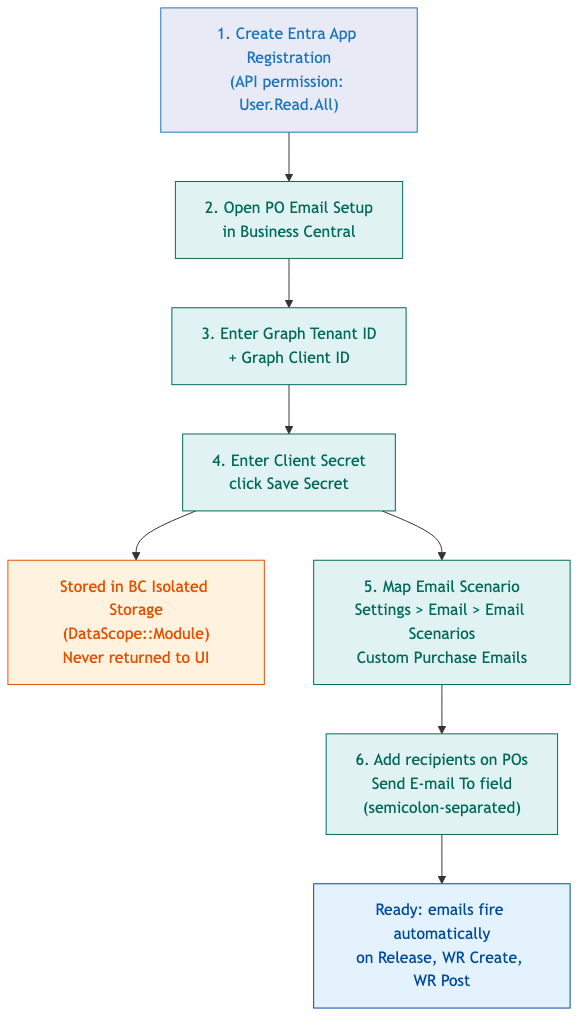
Prerequisites
- An Azure AD (Entra ID) app registration with:
- API permission:
User.Read.All(Application type) - A client secret configured
- API permission:
- The extension published to the BC environment
- The "Custom Purchase Emails" email scenario mapped to an active email account in BC (Settings → Email → Email Scenarios)
- The PoEmailPermissionSet permission set assigned to all users who will use the email lookup or access the setup page
Step 1: Configure Graph API Credentials
- Navigate to Search → PO Email Setup in BC.
- Enter the Graph Tenant ID (your Azure AD tenant ID, e.g.,
823af2fd-...). - Enter the Graph Client ID (the Application (client) ID from the app registration).
- Enter the Client Secret in the masked field.
- Click Save Secret to persist the secret to Isolated Storage.
- The secret is stored in BC's Isolated Storage (
DataScope::Module) and is never returned to the UI after saving. - The Client Secret Stored indicator will show
trueonce saved.
- The secret is stored in BC's Isolated Storage (
- To rotate a secret: enter the new value and click Save Secret again. The old value is overwritten.
- To remove a secret: click Clear Secret.
Step 2: Configure Email Scenario
- Go to Settings → Email → Email Scenarios.
- Locate Custom Purchase Emails and assign it to the outbound email account that should send PO notifications.
Step 3: Set Recipients on a Purchase Order
- Open a Purchase Order.
- In the Send E-mail To field (in the General tab), enter one or more email addresses separated by semicolons (
;). - Use the Lookup action to search Entra ID users by name or email and select from the results. Multiple selections append to the field with semicolons.
How Notifications Work
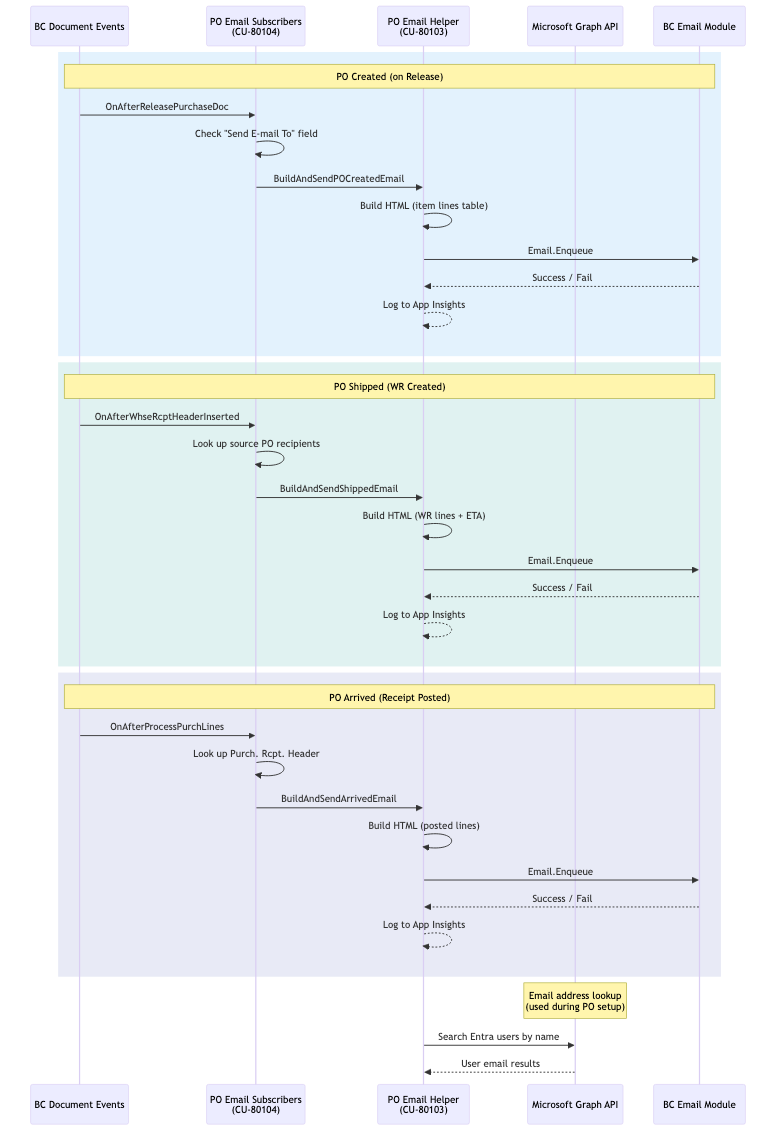
PO Created (on Release)
Fires when a Purchase Order is released (OnAfterReleasePurchaseDoc). The email lists all item lines on the PO at the time of release. No email is sent if "Send E-mail To" is blank.
PO Shipped (on WR Created)
Fires when a Warehouse Receipt is registered (OnAfterWhseRcptHeaderInserted). The email lists only the item lines on the warehouse receipt that are sourced from the PO. No email is sent if the PO has no recipients or if no matching WR lines are found.
PO Arrived (on Receipt Posted)
Fires on OnAfterProcessPurchLines in the purchase posting codeunit (Codeunit 90). This subscriber fires on any posting that produces a Purch. Rcpt. Header, including:
- Warehouse Receipt posting
- Direct PO posting with the Receive option
This is intentional — the "Arrived" notification applies to all receiving scenarios, not only the warehouse flow. Invoice-only postings (which produce no Purch. Rcpt. Header) are filtered out automatically.
Telemetry
All significant events are logged to Application Insights using the extension-level connection string in app.json.

Legend: Green = Normal | Amber = Warning | Red = Error
| Event ID | When | Severity | Key Dimensions |
|---|---|---|---|
setup.missing | PO Email Setup record not found — extension unconfigured | Error | — |
setup.clientid.missing | Graph Client ID is blank in setup | Warning | — |
setup.tenantid.missing | Graph Tenant ID is blank in setup | Warning | — |
setup.secret.missing | Client secret not saved in setup | Warning | — |
graph.token.connfail | Cannot reach Microsoft identity platform | Error | Tenant |
graph.token.httpfail | Token request returned HTTP error | Error | StatusCode |
graph.search.connfail | Cannot reach Graph API | Error | Filter |
graph.search.httpfail | Graph API returned HTTP error | Error | StatusCode, DurationMs |
graph.search.ok | Email search completed | Normal | Count, DurationMs |
graph.search.noresults | Search returned zero users | Warning | Filter |
wr.shipped.start | Shipped notification started | Normal | WR, PO |
wr.shipped.eta.ok | ETA resolved | Normal | — |
wr.shipped.eta.miss | No ETA found | Warning | — |
wr.shipped.norecip | No recipients on PO | Warning | PO |
wr.shipped.lines.miss | No matching WR lines | Warning | — |
wr.shipped.sent | Shipped email enqueued | Normal | WR, PO, RecipientCount |
wr.shipped.enqueue.fail | Failed to enqueue Shipped email | Error | WR, PO |
arrived.start | Arrived notification started | Normal | PO |
arrived.count | Receipt line count logged | Normal | PostedWR, PO |
arrived.norecip | No recipients resolved | Warning | PO |
arrived.nolines | Posted receipt has no item lines | Warning | PostedWR, PO |
arrived.sent | Arrived email enqueued | Normal | PostedWR, PO, RecipientCount |
arrived.enqueue.fail | Failed to enqueue Arrived email | Error | PO |
po.created.start | PO Created notification started | Normal | PO |
po.created.norecip | No recipients on PO | Warning | PO |
po.created.nolines | PO has no item lines | Warning | PO |
po.created.sent | PO Created email enqueued | Normal | PO, RecipientCount, LineCount |
po.created.enqueue.fail | Failed to enqueue PO Created email | Error | PO |
Query for recent enqueue failures:
traces
| where timestamp > ago(7d)
| where message has 'enqueue.fail'
| project timestamp, message
| order by timestamp desc
Query for setup misconfiguration events (typically the first thing to check after deployment):
traces
| where timestamp > ago(7d)
| where customDimensions.eventId in ('setup.missing', 'setup.clientid.missing', 'setup.tenantid.missing', 'setup.secret.missing')
| project timestamp, customDimensions.eventId, message
| order by timestamp desc
Query for Graph API latency (flag searches taking longer than 5 seconds):
traces
| where timestamp > ago(7d)
| where customDimensions.eventId == 'graph.search.ok'
| extend DurationMs = toint(customDimensions.DurationMs)
| where DurationMs > 5000
| project timestamp, message, DurationMs
| order by DurationMs desc
Automated Tests
23 Python-based integration tests in test/, organized across two files:
test_po_email.py(21 tests) — extension deployment, PO API lifecycle, App Insights telemetry, security verification, code quality checks, and app.json configuration validationtest_po_browser.py(2 tests) — Playwright browser tests that release POs through the BC web client UI, verifying the email subscriber fires end-to-end (with and without recipients)
Running Tests
cd "PO Email Notification/test"
python -m venv .venv && source .venv/bin/activate
pip install requests python-dotenv msal pytest pytest-json-report pytest-timeout

# BC API + code quality tests
python -m pytest -m bc -v

# Telemetry tests (requires az login)
python -m pytest -m telemetry -v

# Browser tests (requires Playwright + test user credentials)
pip install playwright pyotp && python -m playwright install chromium
python -m pytest -m browser -v

# All tests
python -m pytest -v

# Browser tests with visible browser
HEADED=1 python -m pytest -m browser -v
Environment Variables
Required in the project-root .env:
| Variable | Description |
|---|---|
BC_TENANT_ID | Azure AD tenant ID |
BC_CLIENT_ID | App registration client ID for BC API access |
BC_CLIENT_SECRET | Client secret for BC API access |
BC_COMPANY_ID | BC company ID (GUID) |
BC_ENVIRONMENT | BC environment name (defaults to Sandbox_Test_11062025) |
BC_COMPANY_NAME | BC company name for browser deep links (defaults to Bestway Inc.) |
TEST_VENDOR_NO | Vendor number for test PO creation (e.g., V00065) |
TEST_ITEM_NO | Item number for test PO lines (e.g., ZTEST-ITEM-001) |
Additional variables for browser tests:
| Variable | Description |
|---|---|
BC_TEST_USER_UPN | Entra user principal name for Playwright login |
BC_TEST_USER_PASSWORD | Password for the test user |
BC_TEST_USER_TOTP_SECRET | Base32 TOTP secret for MFA (if the test user has MFA enabled) |
Known Limitations
- The PO Arrived subscriber fires on all purchase postings that create a receipt, including direct PO posting without a warehouse flow. This is by design — see the comment block in
POEmailSubscribers.codeunit.al. - If the "Custom Purchase Emails" email scenario is not mapped to an account, enqueue failures are silent to end users and only visible in App Insights.
- The recipient split uses
;as the delimiter. Comma-separated addresses in "Send E-mail To" will be treated as a single (invalid) address. - The Graph API user search applies
$top=50. If more than 50 users match the search filter, only the first 50 are returned.