Bestway BC Development — Tools
Shared scripts and utilities used across BC extensions in this repository.
UAT Test Plan Generator
Produces formatted Word documents (.docx) for UAT test plans, matching the established Bestway BC test plan style. All test plans share the same visual style — Roboto font, navy/blue color scheme, amber callout boxes — defined once in the library and applied automatically.
Files
| File | Purpose |
|---|---|
uat_test_plan_lib.py | Generic rendering engine. Accepts a plan definition dict and produces the Word document. Do not edit this file per plan. |
service_order_lockout_test_plan.py | Content file for the Service Order Lockout test plan. |
(future) my_extension_test_plan.py | One content file per extension or test plan. |
Creating a Test Plan for a New Extension
1. Copy an existing content file and rename it:
cp tools/service_order_lockout_test_plan.py tools/my_extension_test_plan.py
2. Update OUTPUT_DIR at the top of the file to point to the target extension folder:
OUTPUT_DIR = os.path.join(os.path.dirname(__file__), "..", "My Extension")
3. Update the plan dict with your extension's content:
plan = {
    "title":       "My Extension Name",
    "project":     "Bestway BC Development",
    "date":        "March 1, 2026",
    "version":     "1.0",
    "environment": "Business Central Sandbox",
    "output":      "UAT Test Plan - My Extension.docx",

    # Optional — omit the key or set to None to skip the pre-UAT notice box
    "notice": "Do not begin testing until XYZ confirms fixes are in place.",

    "changelog": [
        {
            "version": "1.0",
            "date":    "March 1, 2026",
            "author":  "Bestway USA",
            "summary": "Initial test plan.",
        }
    ],

    "overview": "Narrative description of what the extension does and what this plan validates.",

    # Optional — omit the key entirely to skip this section
    "object_summary": [
        {
            "object":  "Table Extension",
            "id":      "52400",
            "extends": "Customer",
            "purpose": "Adds custom fields.",
        }
    ],

    "prerequisites": [
        "The extension is published to the sandbox.",
        "Test data exists.",
    ],

    # Optional — defaults to Tested By / Approved By if omitted
    "sign_off": [
        ("Tested By:",   "Date:"),
        ("Approved By:", "Date:"),
    ],

    "areas": [ ... ],  # see Test Area structure below
}
4. Define your test areas inside the areas list:
"areas": [
    {
        "title": "Test Area 1: Feature Name",

        # Shown in italic gray below the area heading — omit to skip
        "ref": "Requirement: The system must do X.",

        # Shown as regular body text below the ref line — omit to skip
        "intro": "Verify that the feature behaves correctly under normal conditions.",

        # Amber callout box shown before the first test case — omit to skip
        "callout": "Confirm with the developer that fix XYZ is deployed before running these tests.",

        "cases": [
            {
                "id":    "TC-1.1",
                "title": "Descriptive test case title",

                # Amber callout box shown before the step table — omit to skip
                "callout": "Note: this step requires two browser sessions open simultaneously.",

                "steps": [
                    ("1", "Action the tester takes.", "Expected result."),
                    ("2", "Next action.",             "Next expected result."),
                ],
            },
            {
                "id":    "TC-1.2",
                "title": "Another test case",
                "steps": [
                    ("1", "Action.", "Expected result."),
                ],
            },
        ],
    },
    # Add more areas as needed...
]
5. Run the script to generate the document:
python3 tools/my_extension_test_plan.py
The .docx is saved to the path defined by OUTPUT_DIR.
Updating an Existing Test Plan
-
Open the content file for the plan you want to update (e.g.,
tools/service_order_lockout_test_plan.py). -
Make your changes — add test cases, revise step wording, add a new test area, etc.
-
Add a new entry to the
changeloglist:{
"version": "1.1",
"date": "March 15, 2026",
"author": "Bestway USA",
"summary": "Added TC-8.1 to cover lock timeout behavior following defect fix.",
}, -
Bump the
"version"field in the plan dict to match. -
Run the script — it overwrites the existing
.docxin place:python3 tools/service_order_lockout_test_plan.py -
Commit both the updated content file and the regenerated
.docx.
What You Never Need to Touch
uat_test_plan_lib.py is the rendering engine. Unless the visual style of all test plans needs to change (colors, fonts, layout, table structure), leave it alone. Any change there propagates to every test plan the next time each content file is run.
Requirements
pip3 install python-docx
Roboto font must be installed on the system. On macOS it can be installed via Google Fonts or Homebrew. The generated .docx embeds the font name — recipients without Roboto installed will see a fallback font in Word.
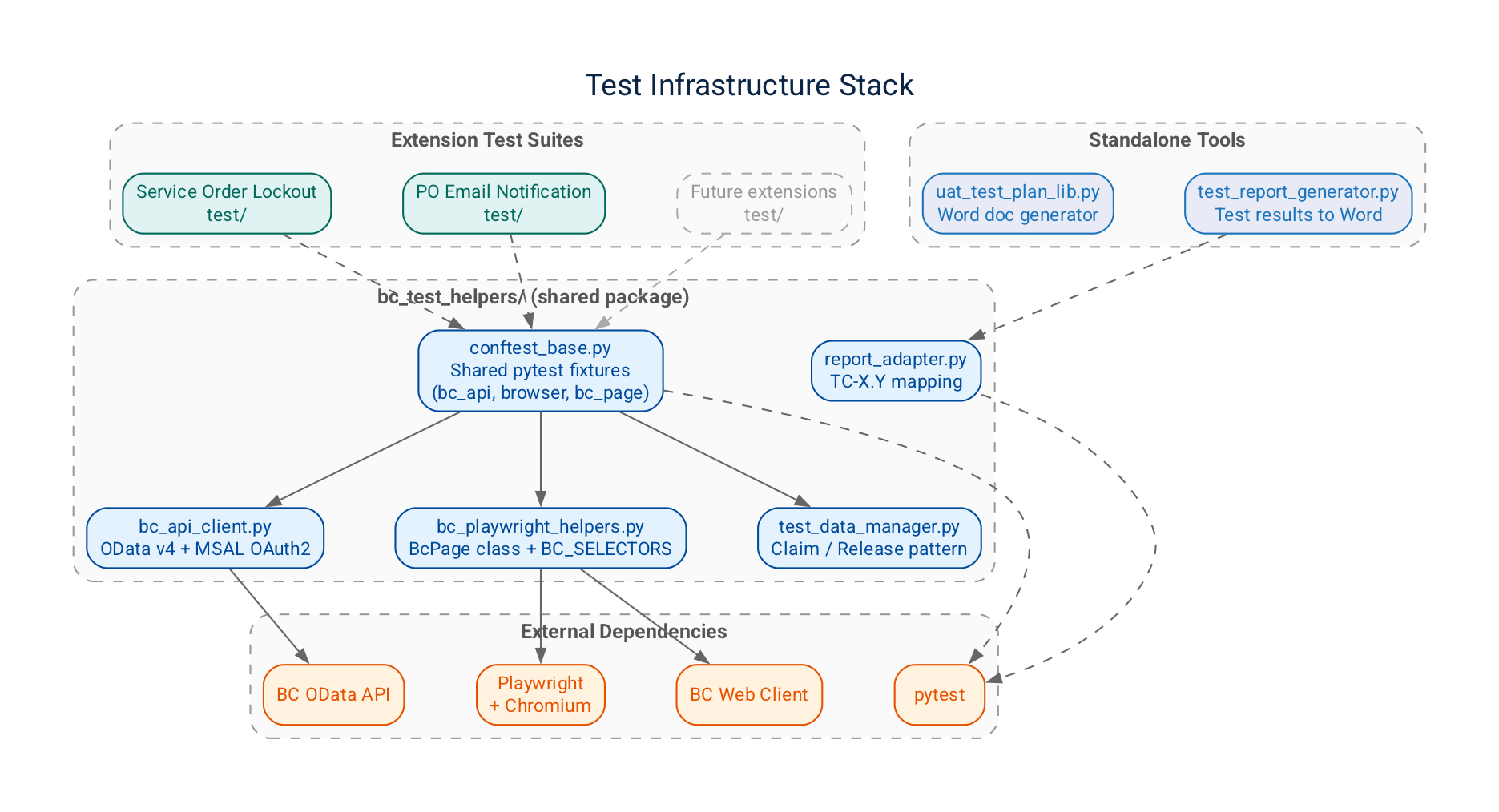
BC Test Helpers (bc_test_helpers/)
Shared Python package providing reusable test infrastructure for all BC extension automated test suites. Import via from bc_test_helpers.<module> import ... after adding tools/ to the Python path (handled automatically by each extension's conftest.py).
Modules
| Module | Purpose |
|---|---|
bc_api_client.py | Generic OData v4 client with MSAL OAuth2 authentication. Provides query, get, post, patch against any BC API entity path. |
bc_playwright_helpers.py | High-level Playwright wrapper for the BC web client. Provides BcPage with methods for navigation, field reading, action inspection, dialog handling, and list operations. All DOM selectors are centralized in BC_SELECTORS. |
bc_user_manager.py | Automated test user lifecycle management — creates, assigns permissions to, and cleans up BC test users via the BC admin API. |
test_data_manager.py | Test record isolation via a claim/release pattern. Claims a set of records at session start, prevents test interference, and resets them on teardown. |
report_adapter.py | Maps pytest result node IDs (e.g., test_01_live_status.py::TestLiveStatusColumn::test_tc_1_1_...) to TC-X.Y test case IDs for use in test results reports. |
conftest_base.py | Shared pytest fixtures (bc_api, browser, bc_context, bc_page). Import all fixtures into an extension's conftest.py with from bc_test_helpers.conftest_base import *. |
BcPage Quick Reference
from bc_test_helpers.bc_playwright_helpers import BcPage

bc = BcPage(playwright_page)                    # wrap a Playwright page
bc.navigate_to_page("Service Orders")          # Tell Me search navigation
bc.open_record_by_row(0)                       # open first row from a list
bc.open_service_order("S-00001234")            # navigate to a specific order by No.
bc.read_field_value("No.")                     # read a field value
bc.is_page_editable()                          # True if card is in edit mode
bc.click_action("Release Lock")               # click an action button
action = bc.get_action("Release Lock")        # get a BcAction proxy
action.is_visible()                            # check visibility
action.is_enabled()                            # check enabled state
action.click()                                 # click
bc.confirm_dialog()                            # click Yes on a Confirm() dialog
bc.dismiss_dialog()                            # click No on a Confirm() dialog
bc.has_lockout_message()                       # True if lockout notification is showing
bc.navigate_next_record()                      # navigate to next record on card
bc.navigate_previous_record()                  # navigate to previous record
bc.close_page()                                # close card and return to list
bc.get_notification_text()                     # read notification/message bar
bc.capture_screenshot("my_test")              # save screenshot to screenshots/
Using in a New Extension
- Add
tools/to the Python path in the extension'sconftest.py:import sys
from pathlib import Path
sys.path.insert(0, str(Path(__file__).resolve().parent.parent.parent / "tools")) - Import shared fixtures:
from bc_test_helpers.conftest_base import * # noqa: F401, F403 - Point
BC_ENV_PATHto the shared root.env(or an extension-local override):os.environ.setdefault("BC_ENV_PATH", str(Path(__file__).resolve().parent.parent.parent / ".env"))
See Service Order Lockout/test/conftest.py as a reference implementation.
Requirements
pip install pytest pytest-json-report pytest-timeout playwright pytest-playwright requests python-dotenv msal
playwright install chromium
Test Results Report Generator (test_report_generator.py)
Parses pytest JSON output (results.json) and produces a styled Word document mapping each test run to its TC-X.Y test case ID. Matches the visual style of UAT test plans (Roboto font, navy headers).
Usage
# From repo root
python3 tools/test_report_generator.py \
    --extension lockout \
    --results-file "Service Order Lockout/test/results.json" \
    --output-dir "Service Order Lockout/docs/"
Or programmatically:
from tools.test_report_generator import generate_report
generate_report("results.json", "output.docx", extension_name="Service Order Lockout")
The generated report includes test case ID, name, tier, outcome (pass/fail/skip), duration, and the full failure message for any failing tests.
pytest JSON Report Setup
The pytest-json-report plugin writes results.json automatically. Add to pytest.ini:
[pytest]
addopts = -v --tb=short --json-report --json-report-file=results.json