Epic — Sync Business Central with FAQ API
Source Document: Download original
Epic: Sync Business Central with FAQ API
As a Business Central system, I need to synchronize data with the FAQ API so that codes and related information remain consistent across systems.
Story 1: Build FAQ API Client for Business Central
Description: As a developer, I need to create an API client in BC to interact with the FAQ API for authentication, data retrieval, and updates.
Acceptance Criteria:
- API client supports authentication with FAQ API.
- Can fetch data from FAQ API.
- Can retrieve updates from FAQ API.
Tasks:
- Implement authentication mechanism for FAQ API.
- Create method to fetch initial data.
- Create method to fetch incremental updates.
Story 2: Add Support for Sync Job with FAQ API Fields
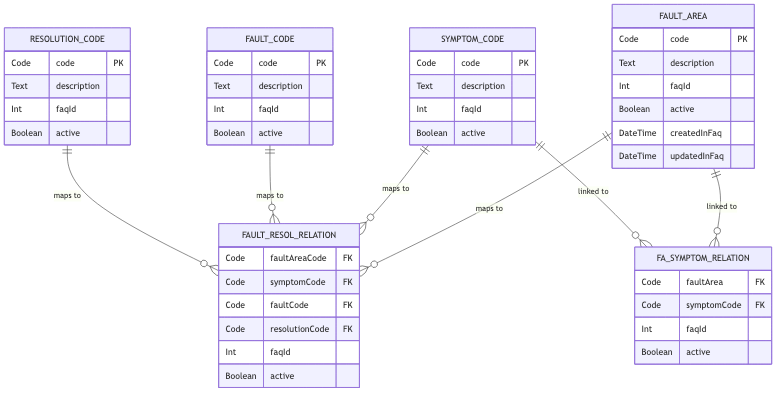
Description: As a developer, I need to map FAQ API fields to BC tables and ensure synchronization.
Acceptance Criteria:
- Fields are added to BC tables:
- FAQ ID (Int)
- Active (Boolean)
- Created in FAQ (Timestamp)
- Updated in FAQ (Timestamp)
- Created in BC (Timestamp)
- Updated in BC (Timestamp)
- Tables updated:
- 5915 -- Fault Area
- 5916 -- Symptom Code
- 5918 -- Fault Code
- 5919 -- Resolution Code
- 5920 -- Fault/Resol. Code Relations
- 50113 -- FaultAreaSymptom Code Re
Tasks:
- Add new fields to specified tables.
- Implement mapping logic between FAQ API and BC tables.
- Validate data integrity during sync.
Story 3: Create BC Job to Fetch Updates Periodically
Description: As a developer, I need a scheduled job in BC to fetch updates from FAQ API at defined intervals.
Acceptance Criteria:
- Job can be scheduled and run periodically.
- Job fetches only updated records since last sync.
Tasks:
- Implement periodic job logic.
- Configure scheduling options.
- Test incremental update functionality.
Story 4: Generate New BC Codes for Synced Entries
Description: As a developer, I need to generate unique 3-4 character codes for new entries created via sync.
Acceptance Criteria:
- Code generation logic ensures uniqueness.
- Code maps correctly to FAQ API ID.
Tasks:
- Implement code generation algorithm.
- Validate uniqueness and mapping.
Story 5: Update BC to Show and Validate Only Active Records
Description: As a user, I should only see and validate records marked as active.
Acceptance Criteria:
- UI filters out inactive records.
- Validation logic respects Active flag.
Tasks:
- Update UI filtering logic.
- Update validation routines.
Story 6: Generate Email Notifications for Synced Changes
Description: As a stakeholder, I want to receive email notifications summarizing synced changes.
Acceptance Criteria:
- Email includes list of changes synced.
- Email sent to configured stakeholders.
Tasks:
- Implement email generation logic.
- Configure recipient list.
- Test email formatting and delivery.
Story 7: Update CSM Quality Report Submission for Verbose Logging
Description: As a developer, I need to enhance error logging for CSM Quality Report submissions.
Acceptance Criteria:
- Log includes failure code.
- Log includes Service Item ID from Posted Service Invoice.
- Log includes Fault Area, Symptom Code, Fault Code, Resolution.
Tasks:
- Update logging mechanism.
- Ensure verbose details captured on failure.
- Validate logs in error scenarios.