CSM 1.0 Fault Detail Sync — Solution Design Document
Source Document: Download original
| Prepared for | Bestway (USA) Inc. |
| Prepared by | Sataware Technologies LLC |
| Date | 12/16/25 |
1. Introduction
This Solution Design document outlines the technical approach for synchronizing fault-related issue data from the FAQ API into Microsoft Dynamics 365 Business Central (BC) for the CSM 1.0 Fault Detail Sync initiative. The design builds upon previously shared artifacts and discussions and is intended to clearly define the approved scope, execution behavior, and boundaries for implementation.
The solution is designed to ensure alignment between Business Central and the FAQ system while preserving historical integrity, avoiding disruption to posted documents, and maintaining consistency with existing BC extensions.
2. Objectives
- Synchronize fault-related master data from the FAQ API into Business Central
- Ensure BC uses only valid and active codes for new transactions
- Preserve historical Service Orders, PSI records, and posted data
- Introduce inactive handling without deleting existing records
- Provide controlled synchronization mechanisms as defined in this document
3. Scope
This Solution Design covers the synchronization of fault-related data entities between the FAQ API and Business Central, including fault areas, symptom codes, fault codes, resolution codes, and their defined relationships.
4. Deliverables
- Updated BC extension logic to support FAQ API synchronization
- One-time full rebuild synchronization capability
- Automated incremental synchronization capability
- Stakeholder notification summary for detected changes
- Final source code delivery
- Supporting technical documentation
5. Data Entities & Tables
The following BC tables are involved in storing and relating fault-related data, as provided in the configuration artifacts supplied by Bestway:
- Fault Area
- Symptom Code
- Fault Code
- Resolution Code
- Fault/Resolution Relationship
- Fault Area/Symptom Relationship
6. Core Design Principles
- No deletion of records once used in posted transactions
- Inactive records retained for historical reference
- Only active values available for new transactions
- Synchronization logic must be safe to re-run
- Existing extension boundaries must be respected
7. Synchronization Approaches
This Solution Design explicitly covers the following synchronization approaches:
- 7.1 One-Time Full Rebuild Sync
- 7.2 Automated Incremental Sync
- 7.3 Stakeholder Notification
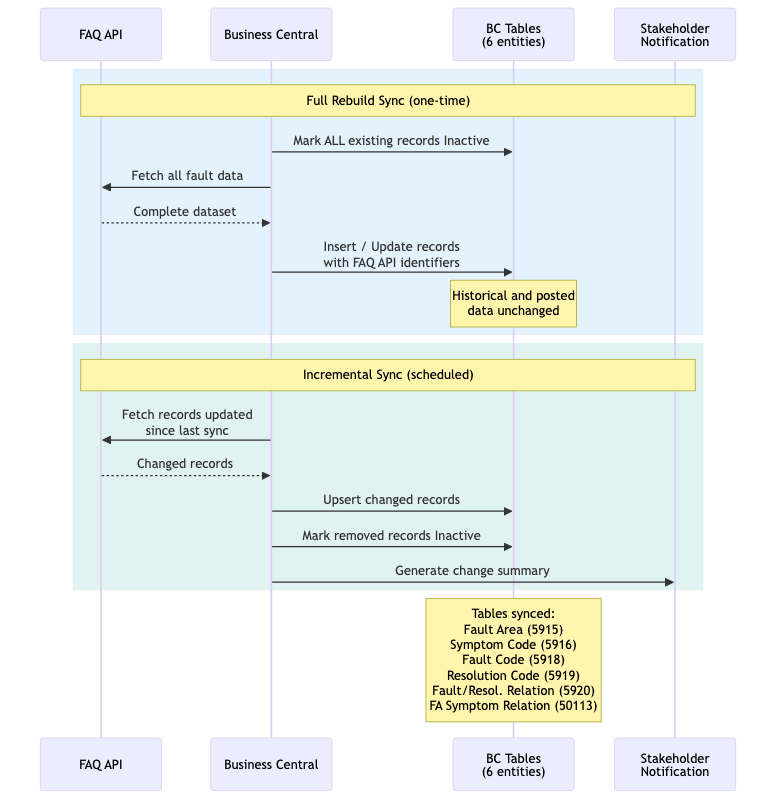
7.1 One-Time Full Rebuild Sync
The one-time full rebuild sync establishes a clean baseline within Business Central by aligning all fault-related data with the FAQ API.
- All existing fault-related records will be marked Inactive
- A complete import will be performed from the FAQ API
- FAQ API identifiers will be persisted as the primary reference
- No legacy-to-API mapping logic will be maintained
- Historical and posted data will remain unchanged
7.2 Automated Incremental Sync
Following the initial rebuild, an automated incremental synchronization process will be used to keep BC aligned with the FAQ API over time.
- Periodic unattended execution
- Detection of changes between API data and BC cache
- Insert new records
- Update modified records
- Mark records Inactive when removed from the API
- Maintain sync state across executions
7.3 Stakeholder Notification
After each automated incremental sync, a notification summary will be generated to inform stakeholders of detected changes.
- Configurable recipient list
- Summary of newly added records
- Summary of updated records
- Summary of records marked Inactive
8. UI & Validation Behavior
User-facing pages and validation logic will be updated so that only Active fault-related values are available for selection in new Service Orders, PSIs, and related transactions. Inactive values will remain stored for historical reference but will not be selectable.
9. Data Safety & Integrity
- No modification of posted documents
- Inactive handling ensures backward compatibility
- Partial updates are avoided
- Repeat executions do not create duplicate or invalid data
10. Estimated Effort
Total estimated effort for the scope defined in this document:
- ~134 hours (approximate)
- Hourly rate: $28/hr
This estimate reflects the combined effort for core sync functionality, one-time rebuild, automated incremental synchronization, and stakeholder notification behavior.
11. Delivery Model
The implementation will follow an outcome-based delivery model:
- Requirements aligned via this Solution Design
- Effort estimate approval
- Final source code delivery with supporting documentation