BC Dev Tools
A Python CLI package for Business Central data analysis, CSM fault code management, FAQ issue type matching, and failed CSM submission resolution. The package connects to multiple external systems to import, normalize, match, and export data.
External Integration
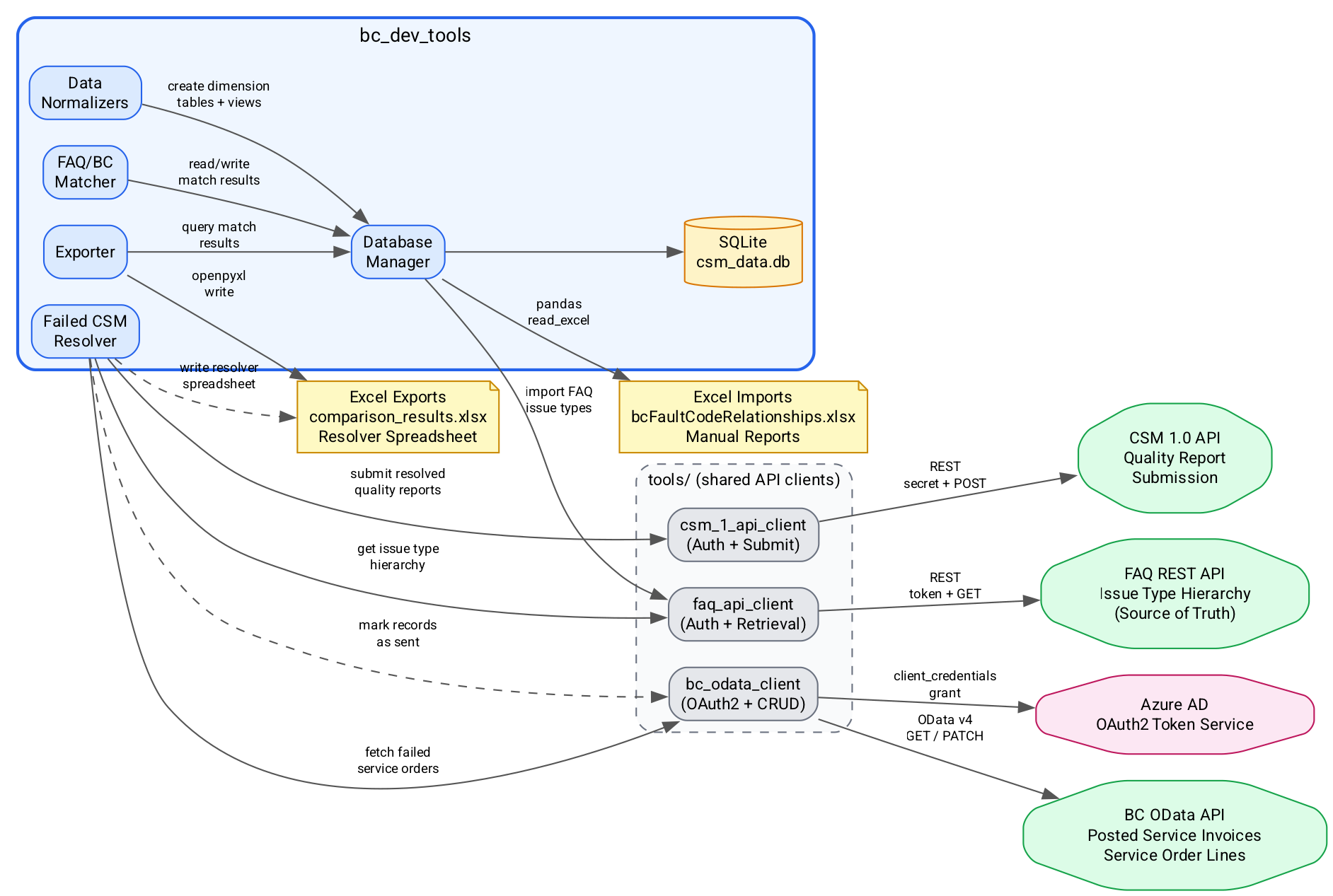
The diagram below shows how bc_dev_tools connects to external systems. The package uses three shared API clients from the repository's tools/ directory, each handling authentication and data transfer for a specific service.
Key systems:
- BC OData API -- Fetches posted service invoices and service order lines via OAuth2 client credentials. Used by the Failed CSM Resolver to pull failed submissions and optionally mark records as sent.
- FAQ REST API -- Retrieves the issue type hierarchy (main categories, sub-categories, issue types, item parts). This is the source of truth for fault code descriptions used during matching.
- CSM 1.0 API -- Submits resolved quality reports via the
ImportQualityendpoint. Used by both the manual submission workflow and the automated resolver pipeline. - Azure AD -- Provides OAuth2 tokens for BC OData access via the client credentials grant flow.
- Excel files -- Local file I/O for importing BC fault code relationships and exporting comparison results and resolver spreadsheets.
- SQLite -- Local database (
csm_data.db) stores imported data, normalized dimension tables, and match results.
Quick Start
# Activate the virtual environment
cd bc_dev_tools
source .venv/bin/activate

# Run the full pipeline (import, normalize, match, export)
python -m bc_dev_tools pipeline

# Or launch the interactive menu
python -m bc_dev_tools interactive

# Run the Failed CSM Resolver
python -m bc_dev_tools resolve run
See the Architecture page for internal structure, Data Model for the normalized schema, and Pipelines for detailed workflow diagrams.