Architecture
Package Structure
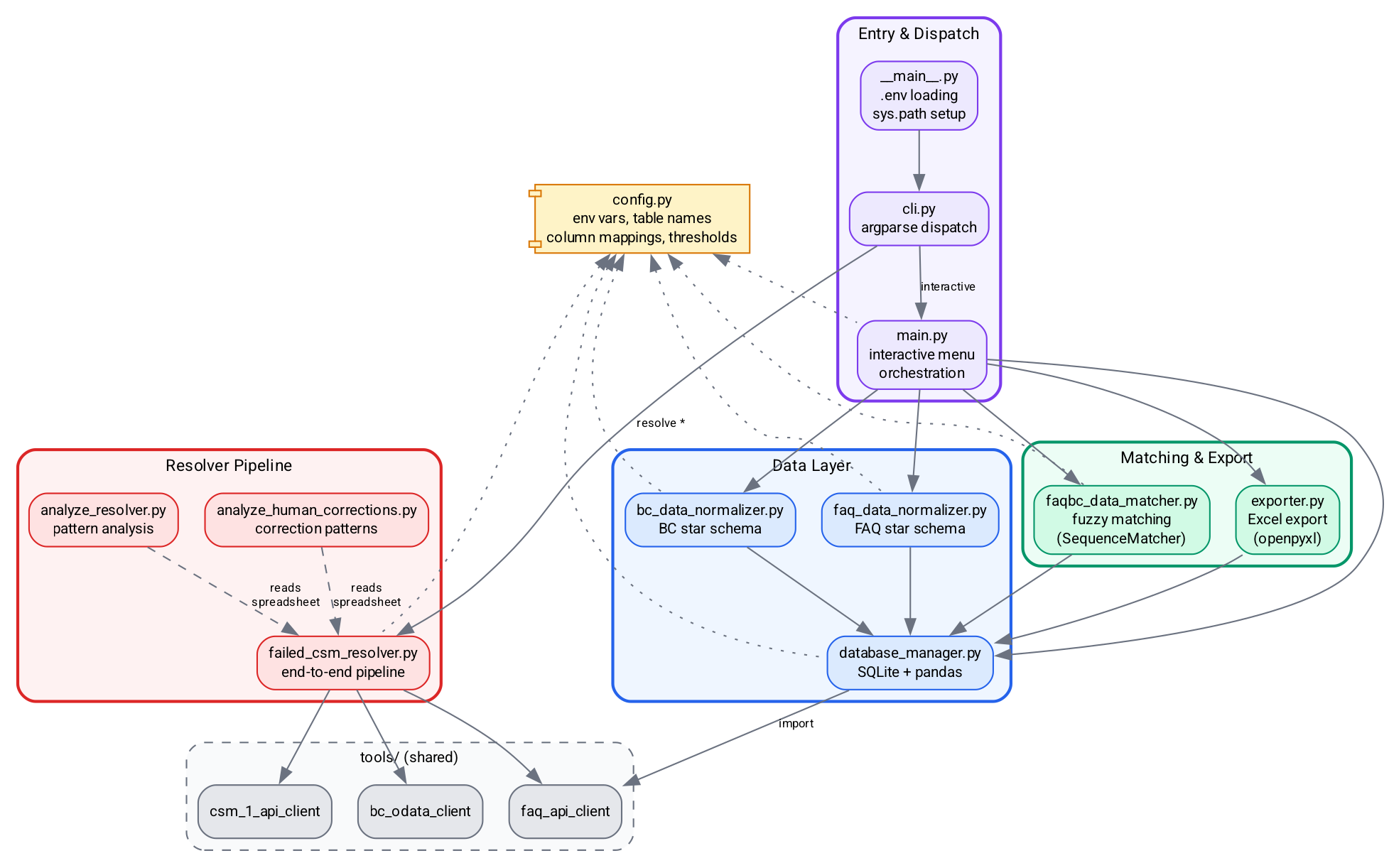
bc_dev_tools is organized into four layers, each with a distinct responsibility. The diagram below shows the module dependency graph -- arrows indicate import relationships.
Entry & Dispatch (purple)
__main__.py-- Entry point. Loads.envfiles (repository root first, then local override), configuressys.pathto include the sharedtools/directory, and delegates tocli.main().cli.py-- Defines the argparse tree and dispatches to handler functions. Uses lazy imports to keep--helpfast.main.py-- Orchestration layer. Contains the interactive menu loop and non-interactive CLI wrapper functions that coordinate the data, matching, and export modules.
Data Layer (blue)
database_manager.py-- SQLite connection manager with pandas integration. Handles Excel imports, API data imports, table creation, column additions, and querying.faq_data_normalizer.py-- Transforms the flat FAQ API response into a star schema: four dimension tables plus a normalized fact table and SQL views.bc_data_normalizer.py-- Same pattern for BC fault code data: four dimension tables, a fact table, and views.
Matching & Export (green)
faqbc_data_matcher.py-- Multi-column fuzzy matching usingdifflib.SequenceMatcher. Compares BC rows against FAQ rows using the column mapping fromconfig.pyand writes match results back to the BC table.exporter.py-- Writes comparison results to a multi-sheet Excel workbook (All Results, Matched, Unmatched) viaopenpyxl.
Resolver Pipeline (red)
failed_csm_resolver.py-- End-to-end pipeline: fetch from BC OData, match against FAQ hierarchy, write spreadsheet, optionally submit to CSM and update BC.analyze_resolver.py-- Statistical analysis of resolver output patterns.analyze_human_corrections.py-- Analysis of manual corrections made to resolver output.
Shared Dependencies
config.py(yellow) -- Centralized configuration from environment variables. Defines table names, column mappings, thresholds, and file paths. Read by all modules.tools/(gray, dashed) -- Shared API clients (bc_odata_client,faq_api_client,csm_1_api_client) used across multiple packages in the repository.
CLI Command Tree
The CLI uses a three-level argparse structure: top-level commands, the import subgroup, and the resolve subgroup. Each command routes to a specific handler function.

Color key:
- Purple -- entry point and import subcommands
- Blue -- top-level commands
- Red -- resolve subcommands
- Green -- handler functions (the actual code that runs)
For the full CLI flag reference, see the CLI documentation in bc_dev_tools/docs/cli.md.